
Building a Transactional Email Platform: From One Team to a Company-Wide Service

Photo by Brett Jordan on Unsplash
I led the development and scaling of our transactional email platform: the system that sends every booking-related message to customers across our travel product. What began as a solution owned by a single team grew into a shared platform that multiple product teams rely on for transactional communications. This post is a high-level look at the product context, architecture, how we scaled collaboration, and what we measured to keep deliverability healthy.
Why the business cares
Our team sits in the Customer Service vertical, and the north star is straightforward: reduce unnecessary contacts with support agents. Each call has a cost, and many of those calls are preventable when customers get the right information at the right time.
A missing booking confirmation is a classic example. The customer does not know whether the booking went through, so they call. That is expensive for the company and frustrating for the customer. Reliable, timely transactional communication is not a nice-to-have; it is part of the product experience.
What the platform does
At its core, the platform turns booking lifecycle events into outbound messages. In practice it includes:
- Email delivery — confirmations, updates, and notifications tied to booking state.
- Multi-channel delivery — SMS and push alongside email where the product requires it.
- Observability — metrics that help us catch deliverability and quality issues before they show up as support tickets.
Architecture in brief
The system is event-driven. Booking changes land on a Kafka topic — booking_updates — which sees on the order of 200,000 messages per day. The wider product supports roughly 50,000 bookings per day. Consumers run in a Java-based distributed backend, deployed on Google Cloud with Docker and Kubernetes. We expose REST APIs for integrations and use batch jobs where asynchronous processing fits better. Datadog covers metrics and alerting.
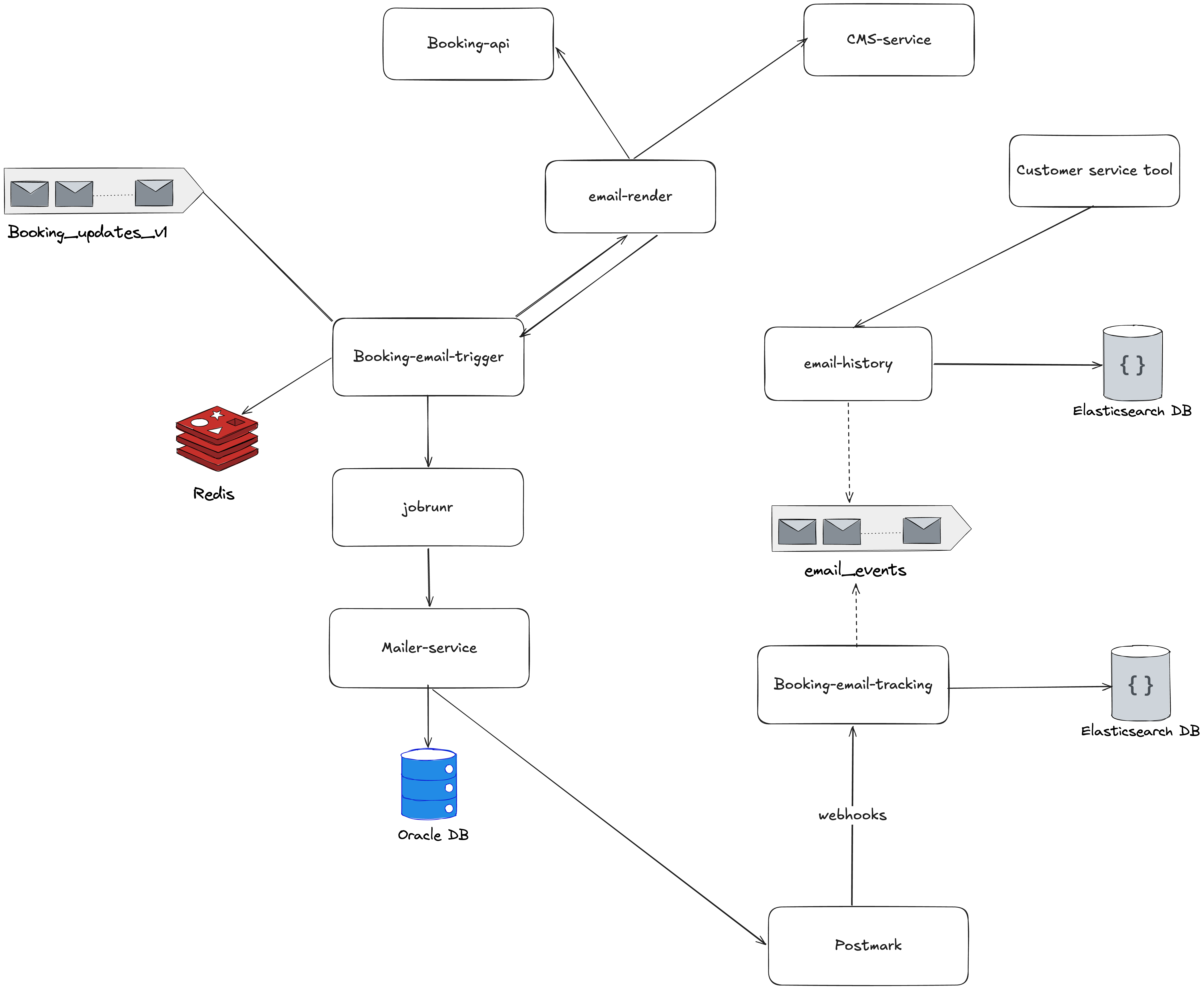
Rough flow:
- A booking event is published to
booking_updates. - Different consumers handle different event types (created, updated, confirmed, cancelled, and so on).
- When a booking reaches a state that should trigger a message — for example confirmed — the corresponding pipeline runs.
- Backend modules assemble content and send email, SMS, or push at the appropriate time.
Fault tolerance and horizontal scaling lean on Kafka consumer groups: multiple instances can share the load, and partitions give us a path to scale consumption as volume grows.
From four templates to twenty-three
The evolution tells the story of the product maturing:
| Phase | What changed |
|---|---|
| Early | Four email types: confirmation, cancellation, modification, reminder. One team owned everything end to end. |
| Now | 23 distinct email templates, with other teams integrating their own transactional flows via the platform. |
The technical work was only part of it. Becoming a shared service meant other teams needed to ship without waiting on us for every small change.
Self-service and documentation
To scale collaboration, we invested in assets other teams could reuse:
- Confluence — integration guides so teams could understand how to plug in without a series of meetings.
- Short recorded walkthroughs — answers to recurring questions, so support did not mean repeating the same explanation in chat.
- Direct collaboration with product teams to clarify requirements and integration points.
- A flexible template system so teams could own more of their own email design and content within guardrails.
The goal was not documentation for its own sake; it was reducing coordination overhead as adoption grew.
Metrics and quality
We tracked delivery health explicitly:
- Open rates — coarse signal that messages are reaching humans and subject lines are not wildly off.
- Spam placement — inbox vs. spam affects trust and support load.
- Delivery success — did the provider accept and deliver the message?
- Latency — time-sensitive communications need predictable processing and send times.
Those metrics feed both operational alerting and conversations with stakeholders about when something is “good enough” vs. worth optimizing further.
Challenges and how we approached them
Scaling to many teams. Documentation, video, and a clear template model turned repeated questions into self-service paths.
Availability expectations. Strong monitoring and alerting aimed to surface issues before customers and support did.
Reliable event processing. Kafka consumer groups, careful consumer design, and operational discipline around consumer lag and failures.
Correct timing. Booking state machines and business rules had to align so messages fired at the right lifecycle stage — wrong state, wrong email, wrong outcome.
Business impact
The platform ties to concrete outcomes: fewer preventable support contacts, lower operational cost per avoided call, better customer experience through proactive updates, and faster feature delivery for other teams that can build on the platform instead of reinventing messaging infrastructure.
My role
I was involved across the lifecycle: architecture and proposals, design discussions with explicit trade-offs, hands-on implementation of core pieces, production ownership (deployments, metrics, reliability), and team-facing work — retrospectives, mentoring, and being a technical contact for partner teams.
How the team worked
We ran Kanban, held retrospectives, used one-on-ones for feedback and health, and treated major technical choices as collaborative — proposals and debate, not single-owner decrees.
Technology summary
| Area | Stack |
|---|---|
| Backend | Java, JBoss |
| Messaging | Kafka (booking_updates, ~200K messages/day) |
| Infrastructure | Google Cloud, Docker, Kubernetes |
| Monitoring | Datadog |
| Channels | Email, SMS, push notifications |
If you are building something similar, the through-line is simple: treat transactional messaging as a product, invest in observability and self-service early, and align event-driven design with the real booking lifecycle — because the cost of a wrong or missing email is measured in support tickets and customer trust, not only in logs.
Comments